
What Is an Ethernet Switch? How It Works and Key Types
Understanding what is an Ethernet switch helps explain how devices communicate efficiently within a local network. An Ethernet switch plays a key role in improving network performance and reliability. Join Axclusive ISP to explore more in the article below.
What is an Ethernet switch?
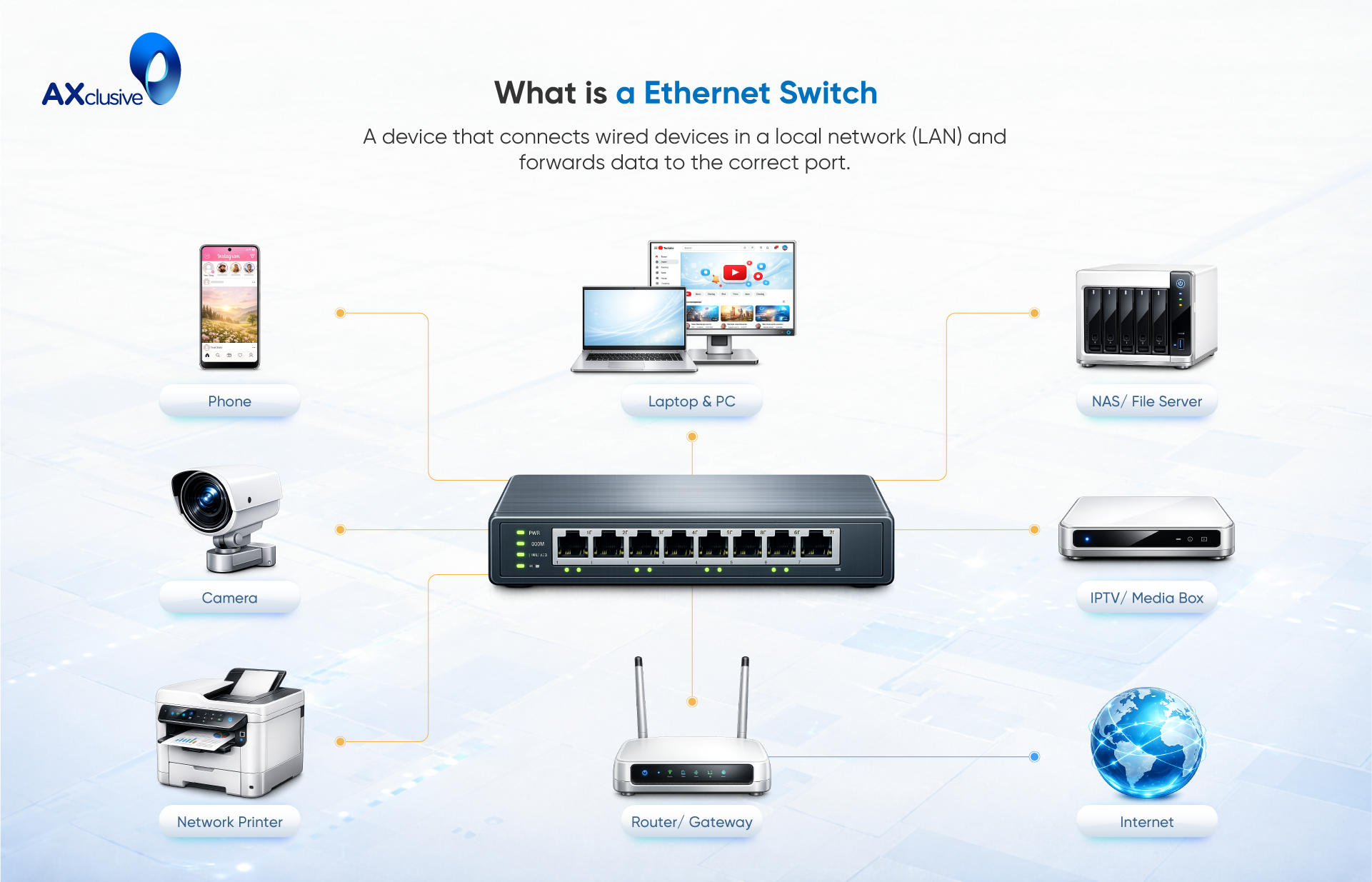
An Ethernet switch is a core networking device used to link multiple wired devices within a local area network. It provides the connection point that allows computers, servers, wireless access points, and powered devices such as PoE equipment and IoT hardware to exchange data efficiently. By managing how traffic flows between connected devices, an Ethernet switch enables reliable internal communication and supports access to external networks such as the internet.
What is the difference between a switch and a router?
| Aspect | Network Switch | Router |
|---|---|---|
| Primary role | Connects and manages communication between devices within the same network | Selects paths and forwards data between different networks |
| Network scope | Operates inside a local area network (LAN) | Connects LANs, WANs, and other autonomous networks |
| Internet connectivity | Does not provide internet access by itself | Required to connect a network to the internet |
| Packet handling | Forwards data between devices on the same network | Routes data packets across multiple networks to reach their destination |
| Typical use in homes | Common in home networks to connect multiple wired devices | Used to connect the home network to the internet |
| Typical use in businesses | Essential for offices and data centers with many connected devices | Used to link internal networks to external networks |
| Scalability | Supports large numbers of devices within a network | Manages traffic between different networks |
How do Ethernet switches work?
Ethernet switches work by linking multiple devices within the same network and controlling how data is delivered between them. Devices are connected to a switch using physical network cables, such as twisted-pair Ethernet, fiber, or coaxial links. Once connected, the switch becomes the central point that manages communication between devices, internal applications, cloud services, and external networks.
Each network-connected device has a unique physical identifier known as a MAC address. When a device sends data, that data is packaged into an Ethernet frame containing both the source and destination MAC addresses. The Ethernet switch reads this information to decide where the data should be sent.
As frames enter the switch, it records the source MAC address and the port it arrived on in a MAC address table. The switch then checks this table to determine whether the destination MAC address is already known. If the destination is found, the switch forwards the data only to the correct port. If the destination is unknown, the switch temporarily sends the frame to all ports until the correct device responds. The switch then updates its table for future traffic.
When devices are connected through multiple switches, each switch repeats this process, forwarding the frame step by step until it reaches the intended destination. This method ensures efficient delivery without sending unnecessary traffic to every device.
Benefits of Using an Ethernet Switch
Ethernet switches provide a reliable foundation for modern local area networks by improving performance, supporting growth, and ensuring consistent data delivery. Their design allows networks to operate efficiently as the number of users and connected devices increases. The key benefits of Ethernet switching are outlined below.
Enhanced Network Performance
Ethernet switches improve network performance by managing traffic intelligently between connected devices. Instead of sending data to all devices, a switch forwards traffic only to the intended destination. This targeted communication reduces congestion and lowers the risk of data collisions, which is especially important in environments with many active users.
Switches also support full-duplex communication, allowing devices to send and receive data at the same time. This doubles the effective throughput of a connection and improves overall responsiveness. As a result, applications run more smoothly, and users experience faster and more consistent network access.
Simple Network Expansion
Ethernet switches make it easy to grow a network as business needs change. They are available in a wide range of sizes and port configurations, allowing organizations to select models that match their current requirements. Additional devices can be connected without redesigning the entire network.
Many enterprise switches support stacking or modular expansion. This allows new capacity to be added by connecting extra switches or installing additional components. By planning expansion in advance, organizations can scale their networks without disrupting existing operations.
Optimized Data Transmission
Ethernet switches improve data efficiency by ensuring traffic is delivered only where it is needed. This reduces unnecessary broadcasts and preserves available bandwidth. Each device receives data intended specifically for it, which improves transfer efficiency across the network.
Switches also support automatic speed negotiation. This feature allows the switch and connected devices to agree on the highest supported data rate. Devices with different performance capabilities can operate on the same network while still achieving optimal connection speeds.
Industry-Wide Network Standards
Ethernet switches are built on widely adopted networking standards defined by organizations such as the IEEE. These standards ensure compatibility between switches and devices from different manufacturers.
This standard-based approach allows organizations to integrate new switches into existing networks without vendor lock-in or interoperability issues. As a result, networks can be expanded or upgraded with greater flexibility and long-term stability
Ethernet Switch Compared to Other Network Devices
Enterprise and business networks often use several types of networking equipment, each designed for a specific role. Ethernet switches are commonly deployed alongside routers, hubs, and Ethernet splitters. Understanding how these devices differ helps ensure the correct design and efficient operation of a network.
Ethernet Switch and Router
- Primary role: An Ethernet switch connects and manages communication between devices within the same local network. A router connects separate networks and directs traffic between them, such as between a LAN and the internet.
- Traffic handling: Switches forward data frames between devices on a single network. Routers forward data packets across different networks based on IP addresses.
- Network layer: Switches typically operate at Layer 2 of the OSI model. Routers operate at Layer 3. Some advanced switches can also perform Layer 3 routing functions.
- Internet access: A switch alone cannot provide internet connectivity. A router is required to access external networks.
- Typical deployment: Switches are used to connect many devices inside offices or data centers. Routers are placed at network boundaries to manage inbound and outbound traffic.
Switch vs Hub
- Functionality: A switch directs data only to the intended device. A hub sends incoming data to all connected devices at the same time.
- Bandwidth usage: Switches allocate bandwidth per port. Hubs share available bandwidth across all ports.
- Collision control: Switches reduce data collisions by isolating traffic paths. Hubs increase collision risk when multiple devices transmit data.
- OSI layer: Switches operate at Layer 2. Hubs operate at Layer 1 and do not analyze or manage traffic.
- Network efficiency: Switches provide structured traffic control. Hubs offer no traffic management and are largely outdated.
Switch vs Ethernet Splitter
- Purpose: A switch manages network traffic and connects multiple devices intelligently. An Ethernet splitter only divides a single physical connection into multiple outputs.
- Traffic control: Switches analyze and forward data based on device addresses. Splitters do not manage traffic flow.
- Device intelligence: Switches actively process data frames. Most splitters are passive and simply extend a signal.
- Network layer: Switches operate at Layer 2. Ethernet splitters operate at Layer 1.
- Use case: Switches are used to build and manage networks. Splitters are used only to extend physical connectivity, not to control communication.
Types of Ethernet Switches
Ethernet switches are designed to forward data from multiple input ports to the correct output port, ensuring information reaches its intended destination within a local or wireless local area network. By directing traffic efficiently, switches support stable communication between connected devices and reduce unnecessary network congestion. In practice, Ethernet switches are categorized based on how they are managed and the network layer at which they operate.
Managed and Unmanaged Switches
- Unmanaged switches are designed for simple networks. They require no configuration and work immediately after connection. These switches are commonly used in homes or small offices to connect basic devices, but they offer limited visibility, security, and performance control.
- Managed switches are used in larger or more complex networks. They provide configuration options, traffic control, monitoring, and security features. Managed switches support scalability and are suitable for environments where performance and reliability are critical.
Switch Management Capabilities
- Modern managed switches support centralized or standalone management through web interfaces, controllers, or cloud platforms.
- Features such as remote monitoring, configuration automation, and zero-touch provisioning simplify deployment and ongoing operations.
- Integration with network security systems allows switches to be managed as part of a unified infrastructure, improving visibility and control.
Layer 2 and Layer 3 Switching
- Layer 2 switches forward traffic based on MAC addresses. They are efficient for internal network communication but do not perform routing functions.
- Layer 3 switches support IP-based routing and network segmentation. They combine switching and routing capabilities, enabling better scalability and traffic control in larger networks.
Choosing the Right Ethernet Switch for Your LAN
Selecting the right Ethernet switch is a critical decision for building a secure, scalable, and reliable local area network. Modern Ethernet LANs must support increasing device density, higher traffic volumes, and stricter security requirements. Beyond raw speed, organizations should evaluate how well a switch supports power delivery, device onboarding, traffic control, visibility, automation, and long-term cost management. The following considerations help ensure the Ethernet switch you choose meets both current demands and future growth.
Network Speed Requirements
Ethernet switches are long-term infrastructure investments, often remaining in service for many years. During that time, bandwidth demands continue to grow as more devices and applications rely on the network. Switches should support current performance needs while allowing room for expansion. Selecting models that accommodate higher port speeds and future upgrades helps maintain consistent user experience as traffic increases.
Power and PoE Support
Many modern devices rely on Ethernet not only for data but also for power. Power over Ethernet (PoE) support allows switches to supply power directly to connected devices such as IP phones, cameras, and wireless access points. Choosing switches that support current PoE standards ensures compatibility with newer devices and simplifies cabling by reducing the need for separate power sources.
IoT Device Connectivity
As organizations deploy more connected devices, secure onboarding becomes more complex. Ethernet switches should support automated device identification and onboarding processes. This reduces manual configuration and helps enforce security policies. Support for zero-trust principles ensures that only authorized devices gain access to network resources.
Traffic Prioritization and QoS
Not all network traffic has the same importance. Quality of service (QoS) features allow switches to prioritize critical applications such as voice, video, and business systems over less sensitive traffic. Effective traffic prioritization helps maintain consistent performance even during peak usage periods.
Network Monitoring and Visibility
Visibility is essential for managing and troubleshooting networks. Ethernet switches should offer clear insight into traffic patterns, device status, and potential issues. Features such as centralized management, automated provisioning, and integration with security systems allow administrators to manage networks efficiently and respond quickly to problems.
AI and Machine Learning Features
AI and machine learning capabilities help network teams move from reactive to proactive operations. When integrated into Ethernet LAN management, these features can identify anomalies, predict failures, and automate corrective actions. For best results, switches should integrate with broader network intelligence platforms that combine wired, wireless, and security data.
Budget and Cost Considerations
While Ethernet standards are consistent, total cost of ownership can vary significantly. Beyond hardware costs, organizations should consider licensing fees, support contracts, and operational expenses. Evaluating long-term costs and understanding which features require additional licenses helps avoid unexpected expenses and ensures sustainable network investment.
FAQ
What’s better, an Ethernet splitter or a switch?
An Ethernet switch is the better option for networking. It actively manages traffic and delivers data to the correct device, while an Ethernet splitter only divides a physical connection and does not control traffic flow.
Can you use an old router as an Ethernet switch?
Yes, an old router can be used as a switch by disabling routing features and connecting devices through its LAN ports. However, it will not offer the same performance or management features as a dedicated switch.
Is a switch faster than a router?
A switch is generally faster for internal network traffic because it forwards data directly between devices. A router is designed to handle traffic between networks, which involves more processing.
How to convert a router into a switch?
To convert a router into a switch, disable DHCP, assign a static IP within the network range, and connect devices using the LAN ports instead of the WAN port.
An Ethernet switch remains a fundamental component in building efficient and reliable networks. By enabling direct communication between connected devices, it helps optimize traffic flow, reduce congestion, and support scalable network growth. Through this article, we gain a clearer understanding of how Ethernet switches function and why they are essential in modern network environments.
Back to blog