
What Affects VoIP Call Quality and How to Improve It
Crystal-clear audio is the backbone of modern business communication. However, achieving consistent VoIP Call Quality requires managing a complex mix of bandwidth, latency, and hardware configurations. Join Axclusive ISP in the article below as we explore the key influencing factors and practical strategies to optimize your internet phone system for peak performance.
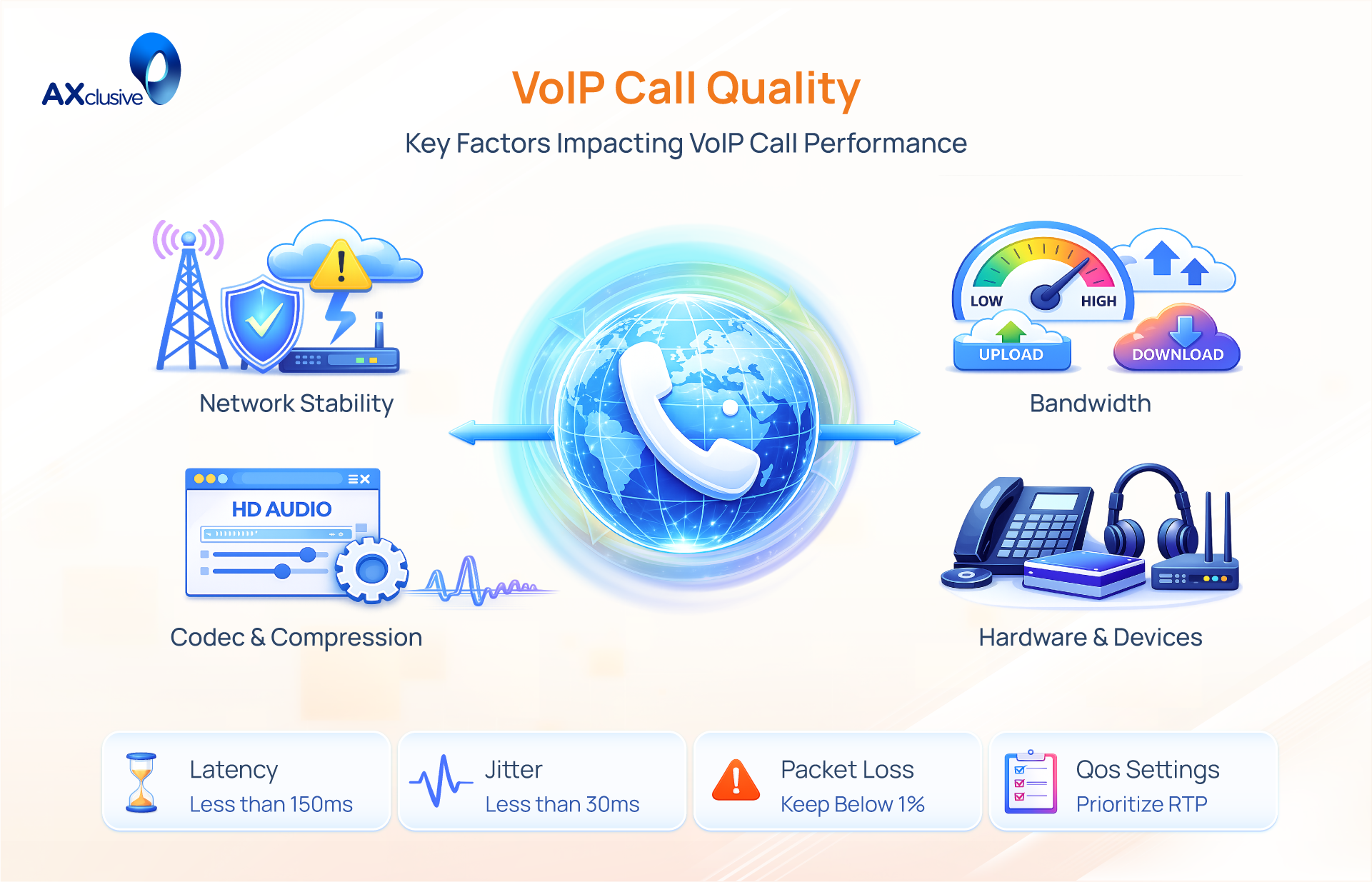
VoIP Call Quality Influencing Factors
VoIP call quality relies on stable, real-time data delivery. Explore the essential technical factors affecting audio clarity below.
Internet Speed and Connection Stability
Bandwidth acts as the pipe for your data. While VoIP quality does not require massive throughput, it demands consistency. A connection that offers high speeds but fluctuates frequently will cause audio dropouts. You generally require a dedicated upload and download speed of at least 3-5 Mbps per active line. A stable connection ensures that the data flow remains constant, preventing the choppy audio associated with network congestion.
Call Latency and Delay
Latency is the measurable time delay between speaking and the other person hearing you. High latency creates a frustrating “talk-over” effect, where participants accidentally interrupt one another because they are out of sync. For a natural, conversational experience, latency must remain below 150 milliseconds. Values higher than this result in a noticeable lag that disrupts the flow of communication.
Jitter
Jitter represents the variance in packet arrival times. In a healthy network, packets arrive in a steady stream. When network congestion occurs, packets arrive at irregular intervals—some fast, some slow. This variance causes the audio to sound scrambled, robotic, or garbled. While VoIP systems use “jitter buffers” to smooth out minor irregularities, high jitter levels will exceed the buffer’s capacity and degrade the audio.
Packet loss
Packet loss occurs when data units fail to reach their destination entirely. Because VoIP occurs in real-time, the system cannot stop to request the re-transmission of missing data. This results in missing syllables, dropped words, or silence. Even a packet loss rate as low as 1% can noticeably degrade call quality voip, while higher rates can make conversation impossible.
Voice Codecs and Compression
Codecs are the algorithms used to compress voice signals for transmission. They dictate the balance between audio fidelity and bandwidth usage. “Narrowband” codecs (like G.729) compress data heavily to save bandwidth but can sound muffled. “Wideband” or HD codecs (like G.722 or Opus) provide rich, lifelike audio but require a robust network connection to function correctly.
Quality of Service (QoS) Policies
Quality of Service (QoS) is a router configuration that manages traffic priority. Without QoS, voice packets must compete for space with less urgent data, such as large file downloads or video streaming. Implementing QoS rules ensures that voice traffic is processed first. This prioritization prevents network congestion from affecting the clarity of your calls.
Network Distance and Routing Path
Physical distance impacts the speed of data transmission. Data traveling internationally encounters higher latency simply due to the laws of physics and the number of “hops” across different networks. To mitigate this, high-end VoIP providers use geographically distributed data centers. This ensures that your call connects to a server near your physical location, minimizing the travel distance and reducing delay.
Ways to Improve VoIP Call Quality
Improving VoIP call quality requires a systematic approach that covers everything from network infrastructure to end-user equipment. By combining performance monitoring with strategic hardware and software optimizations, you can establish a stable environment for clear communication. Implement the following practical steps to diagnose and resolve the most common quality issues
Monitoring Call Performance Metrics
You cannot fix what you do not measure. The first step to improvement is establishing a baseline for your VoIP call quality. Use monitoring tools to track specific health metrics of your voice traffic. Most enterprise VoIP providers offer built-in analytics dashboards, such as Voice Insights. These tools analyze the data stream of your calls in real-time.
Focus on three key indicators:
- Jitter: Look for variations in packet arrival times. High jitter numbers indicate network congestion.
- Packet Loss: Check for the percentage of data lost in transit. A rate above 1% requires immediate attention.
- Latency: Measure the delay. If this exceeds 150ms, your network path is too long or too slow.
Review these logs regularly. Look for patterns. If poor quality occurs only at 2:00 PM, you likely have a bandwidth congestion issue caused by other business activities. If one specific user always has bad audio, the issue is likely their specific hardware or local connection.
Increasing Available Bandwidth
VoIP requires a dedicated amount of throughput to function correctly. If your internet connection is saturated by other tasks, voice packets will queue behind less urgent data. This causes lag and robotic audio. While voice calls use relatively little data individually, the aggregate demand of multiple concurrent calls can overwhelm a small connection.
Evaluate your current internet plan. Ensure your upload speed is sufficient, as this is often the bottleneck for voice communication. If you cannot upgrade your speed, manage the existing consumption. Restrict high-bandwidth activities, such as large cloud backups or video streaming, during business hours. Ensure that your network creates a wide enough pipe for voice data to flow without obstruction.
Upgrading Network Hardware
Consumer-grade routers often lack the processing power to handle the complex demands of VoIP traffic. A router acts as a traffic cop. It directs data packets to the correct device. Older or inexpensive routers have slow processors and limited memory (RAM). When traffic gets heavy, these routers struggle to process packets quickly enough, causing delays and dropped calls.
Replace aging infrastructure with business-grade hardware. Look for routers that specifically support SIP (Session Initiation Protocol) and VoIP. Modern routers feature powerful dual-core or quad-core processors capable of managing thousands of simultaneous connections without slowing down. This hardware upgrade ensures that the device managing your traffic is not the weak link in the chain.
Implementing Jitter Buffers
Jitter occurs when voice packets arrive at your phone in the wrong order or at irregular intervals. This makes audio sound scrambled. A jitter buffer is a software feature that acts as a waiting room for these packets. It collects incoming data, stores it briefly, reorders it correctly, and then plays it for the listener in a smooth stream.
Configure the jitter buffer settings on your VoIP endpoint or router. There are two types:
- Static Buffers: These have a fixed size. They work well for stable networks.
- Dynamic Buffers: These adjust their size automatically based on current network conditions.
Note that increasing the buffer size adds a small amount of delay (latency) to the call. You must find the balance where the audio is smooth but the delay is not noticeable.
Applying QoS Rules
Quality of Service (QoS) is the most effective software tool for fixing audio issues. QoS allows you to train your router to discriminate between different types of traffic. Without QoS, a router treats a voice packet the same as a YouTube video packet. If the video packet arrives first, it gets processed first.
Access your router’s administration interface to configure QoS. Create a rule that identifies VoIP traffic (often by MAC address or port number) and assigns it “High Priority” or “Real-Time” status. Once active, the router will always process voice data before anything else. Even if someone downloads a massive file, your call quality will remain stable because your data skips the line.
Separating Voice Traffic with VLANs
For larger offices, simply prioritizing traffic is not enough. You should segregate it. A Virtual Local Area Network (VLAN) creates a separate digital lane specifically for your phones. It logically separates voice traffic from general data traffic (like emails and web browsing), even though they travel over the same physical cables.
Configure a Voice VLAN on your network switches. This prevents broadcast storms—bursts of data traffic from computers—from interfering with phone calls. It also simplifies troubleshooting. If call quality drops, you know the issue is contained within the Voice VLAN configuration and not caused by a user’s computer activity. This segmentation provides a dedicated, protected environment for your communication system.
Using Wired Ethernet Connections
Wi-Fi is convenient, but it is the enemy of VoIP call quality. Wireless signals are susceptible to interference from walls, other electronic devices, and even neighboring networks. This interference causes packet loss, resulting in choppy audio. For a professional voice environment, stability is paramount.
Connect all desk phones and VoIP computers directly to the network using Ethernet cables (Cat5e or Cat6). A wired connection provides a shielded, consistent path for data. It eliminates the variable of signal strength. If you must use a laptop, use a docking station with an Ethernet port. Eliminating Wi-Fi from the equation is often the single most effective fix for jitter and dropped calls.
Choosing Professional Audio Equipment
The best network in the world cannot fix a bad microphone. Cheap headsets and built-in laptop microphones pick up background noise, cause echoes, and distort frequencies. This degrades the experience for the person listening to you, even if the connection is perfect.
Invest in professional-grade headsets designed for VoIP. Look for devices with hardware-based noise cancellation and digital signal processing (DSP). USB headsets generally offer better quality than analog (3.5mm jack) ones because they bypass the computer’s internal sound card. A quality headset ensures that the audio entering the network is clear, crisp, and isolated from office noise.
Disabling Bluetooth Interference
Bluetooth devices operate on the 2.4 GHz frequency, the same frequency used by many Wi-Fi networks and cordless phones. If a workspace is crowded with wireless mice, keyboards, and headphones, the radio signals can overlap and conflict. This “spectrum congestion” causes data packets to be dropped or delayed.
If you experience static or connection drops while using a Bluetooth headset, switch to a wired USB headset or a DECT wireless headset. DECT technology operates on a different frequency (usually 1.9 GHz) dedicated to voice, keeping your audio signal clear of Wi-Fi and Bluetooth traffic. Turning off unused Bluetooth radios on mobile devices and computers further clears the airwaves for your active connections.
Troubleshooting VoIP Call Quality Issues
Resolving VoIP audio issues requires a systematic approach, not guesswork. By isolating network bottlenecks, configuration errors, and hardware failures, you can quickly pinpoint the root cause. Follow this diagnostic protocol to efficiently restore call quality.
Evaluating Business Impact
The first step in troubleshooting is determining the scope. You must identify if the audio issues are affecting a single user, a specific department, or the entire organization. If only one remote employee reports choppy audio, the issue is likely their local Wi-Fi or home internet connection. However, if an entire office location experiences dropped calls simultaneously, the problem lies with the central network or the ISP. Accurately defining the scale of the issue prevents you from wasting time troubleshooting the wrong endpoint.
Analyzing Network Performance
VoIP performance depends on a stable and well managed network foundation. To maintain consistent call quality, use network monitoring tools such as Wireshark or built in router analytics to track real time metrics like latency, jitter, and packet loss.
Pay close attention to performance spikes during periods when VoIP call quality drops. Bandwidth congestion caused by video streaming, large file transfers, or cloud backups can disrupt voice traffic. Instead of relying on a basic speed test, monitor bandwidth stability and network consistency over time to detect intermittent performance issues.
Check Endpoints and User Devices
Hardware is a frequent point of failure. A perfectly configured network cannot fix a broken headset or an overloaded computer. Inspect the physical devices used for calls. Ensure that desk phones are running the latest firmware. For softphone users, verify that their computer has sufficient RAM and CPU resources available.
Often a network issue is actually a low-quality Bluetooth headset running out of battery or suffering from interference. Standardizing professional-grade hardware across the team eliminates these variables.
Review Codec and Compression Settings
Codecs determine how voice data is compressed for transmission. Mismatched or inefficient codec settings can degrade quality. Ensure your system is using a high-quality codec like G.711 or G.722 (HD Voice) if your bandwidth allows it. While high-compression codecs like G.729 save data, they often result in robotic or muffled audio. Additionally, verify that your system is not performing unnecessary “transcoding” (converting one codec to another mid-stream), as this introduces latency and reduces clarity.
Audit QoS and Security Configurations
Your network infrastructure must be told to prioritize voice. Audit your router’s Quality of Service (QoS) rules to confirm that SIP and RTP traffic (the protocols used for VoIP) are set to the highest priority. Simultaneously, check your firewall and NAT (Network Address Translation) settings. Overly aggressive firewalls can block or delay voice packets, causing one-way audio or dropped calls. Ensure that the necessary ports are open and that features like SIP ALG (Application Layer Gateway) are disabled, as they often interfere with VoIP signals.
Reproducing Issues with Test Calls
Do not wait for user complaints to diagnose a problem. Conduct synthetic test calls to replicate the issue in a controlled environment. Place calls between different office locations, and between the office and remote VPN users. Use the “echo test” function provided by many VoIP services to hear exactly what the network sounds like. By testing different connection paths, you can isolate exactly where the breakdown occurs—whether it is the internal LAN, the ISP connection, or the VPN tunnel.
Escalating with Diagnostic Data
If your internal troubleshooting confirms the network and hardware are functioning correctly, the issue likely lies with the ISP or the VoIP provider. When contacting support, avoid vague descriptions like “the call sounds bad.” Instead, present actionable data. Provide logs showing specific timestamps, packet loss percentages, and MOS (Mean Opinion Score) ratings. Providing a traceroute that shows exactly where packets are dropping allows the provider’s engineering team to fix the issue significantly faster.
VoIP Call Quality FAQ
How Does a VoIP Call Quality Test Work?
A VoIP call quality test measures how voice data performs over a network. It analyzes key metrics such as latency, jitter, packet loss, and sometimes MOS (Mean Opinion Score). These results help identify network issues that may cause poor audio, delays, or dropped calls.
What Causes Jitter in VoIP Calls?
Jitter in VoIP calls is caused by inconsistent packet delivery. Common reasons include network congestion, unstable internet connections, wireless interference, insufficient bandwidth, and lack of traffic prioritization for voice data.
How Can Small Offices Improve VoIP Call Quality?
Small offices can improve VoIP quality by using a stable internet connection, enabling QoS for voice traffic, switching to wired Ethernet, upgrading network hardware, and reducing unnecessary bandwidth usage during business hours.
How to Maintain Consistent Call Quality with VoIP?
Consistent VoIP call quality is achieved through regular network monitoring, proper QoS configuration, sufficient bandwidth planning, reliable hardware, and separating voice traffic from general data usage.
In conclusion, maintaining superior VoIP call quality requires more than just a fast internet connection; it demands a proactive approach to network management. By monitoring critical metrics like latency and jitter, and implementing the practical hardware and software optimizations outlined in this guide, businesses can effectively eliminate audio disruptions. Axclusive hopes this comprehensive resource empowers you to secure a stable communication infrastructure, ensuring every call remains crisp, clear, and professional.
☎️ Contact us today to improve your VoIP call quality and ensure reliable business communication.
Back to blog