
How Does a Router Work? Understanding Network Routing
How does a router work? A router plays a key role in directing data between networks, ensuring information reaches the correct destination efficiently and securely. Join Axclusive ISP to explore how routers work and their role in modern networks in this article.
What Is a Network Router?
A network router is a device that links multiple networks or subnetworks and controls how data moves between them. Its primary role is to examine packet destination information and forward traffic to the correct IP address, ensuring data reaches the intended network. At the same time, a router enables many devices to share a single internet connection by managing traffic flow between internal and external networks.
In most environments, routers are used to connect local area networks (LANs) to wider networks. A LAN consists of devices located within a limited physical area, such as an office or home, and typically requires only one router to manage connectivity. When networks span larger geographic regions, they form a wide area network (WAN). Organizations operating across multiple locations deploy separate LANs at each site and interconnect them through a WAN. Because WANs cover long distances and support higher traffic volumes, they often rely on multiple routers and switches to maintain reliable communication between sites.
How Does A Router Work
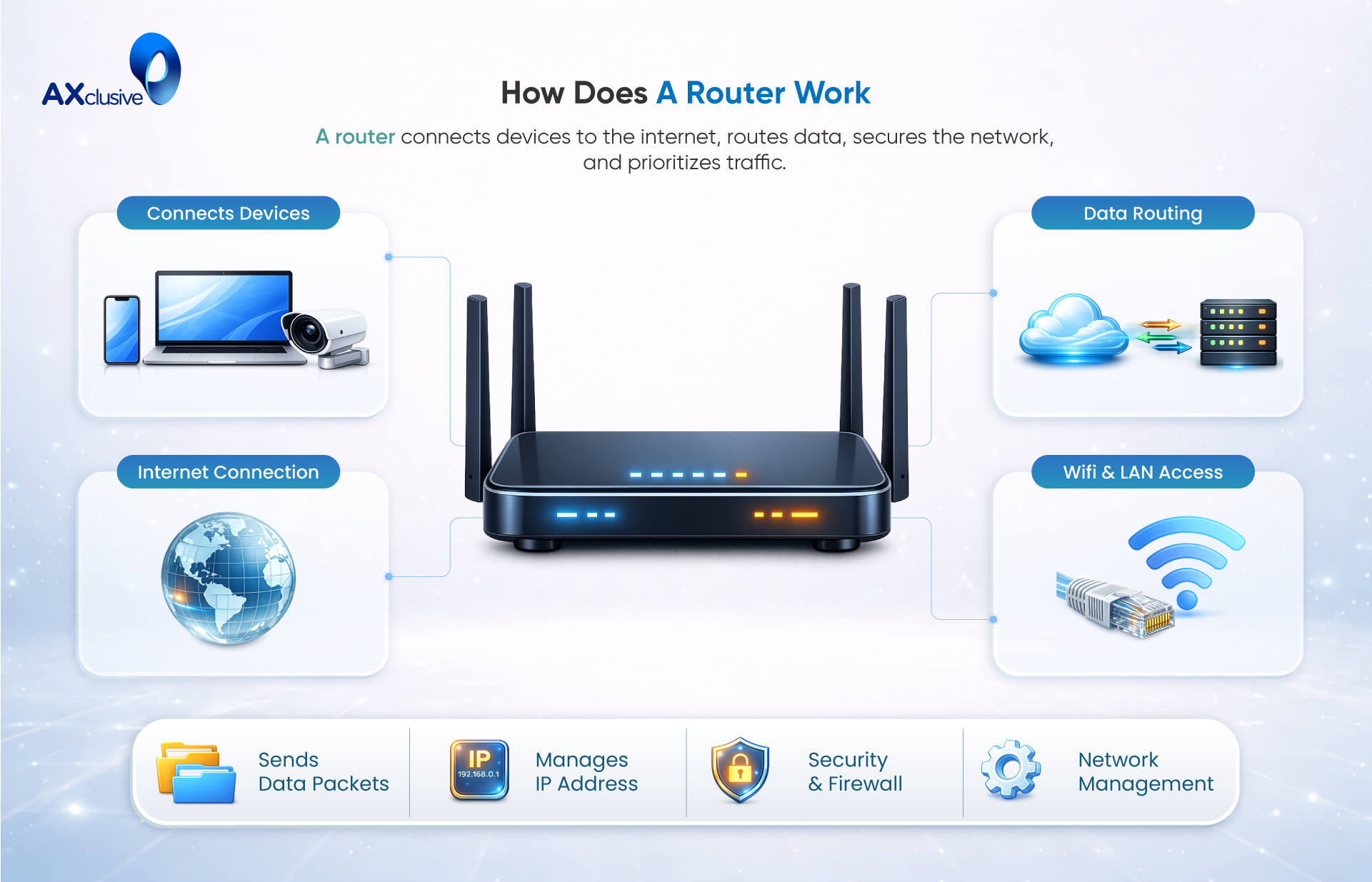
A router can be understood as the decision-making component of a network, responsible for guiding data packets to their intended destinations across interconnected networks. Each packet carries addressing information that specifies where it needs to go, and the router ensures that this information is interpreted correctly so the packet can move forward without unnecessary delays or misrouting.
To perform this function, a router relies on a routing table, which contains a set of known network destinations and the optimal paths to reach them. When a packet arrives, the router examines key fields in the packet header—most importantly the destination IP address—then compares this information against its routing table. Based on this evaluation, the router determines the most efficient next hop and forwards the packet accordingly. This process is repeated at each routing point until the packet reaches its final destination, enabling reliable and orderly data transmission across complex network environments.
Differences Between a Router and a Modem
A router can be understood as the decision-making component of a network, responsible for guiding data packets to their intended destinations across interconnected networks. Each packet carries addressing information that specifies where it needs to go, and the router ensures that this information is interpreted correctly so the packet can move forward without unnecessary delays or misrouting.
To perform this function, a router relies on a routing table, which contains a set of known network destinations and the optimal paths to reach them. When a packet arrives, the router examines key fields in the packet header—most importantly the destination IP address—then compares this information against its routing table. Based on this evaluation, the router determines the most efficient next hop and forwards the packet accordingly. This process is repeated at each routing point until the packet reaches its final destination, enabling reliable and orderly data transmission across complex network environments.
What are the different types of routers?
Routers are designed for different network sizes and use cases. While the basic function remains the same, each router type serves a specific role in managing traffic and connectivity. The main types of routers can be outlined as follows:
- Wireless router: A wireless router connects to a modem using an Ethernet cable and distributes data through wireless signals. Instead of creating a wired local network, it forms a wireless local area network (WLAN) that allows devices to connect without physical cables. Wireless routers are commonly used in homes and small offices to support laptops, smartphones, and other mobile devices.
- Wired router: A wired router also connects to a modem via Ethernet, but it uses physical network cables to link devices within the network. This setup creates a traditional local area network (LAN). Wired routers are often chosen when stable connections, predictable performance, or enhanced security are required.
- Core router: Core routers are used in large enterprise or service provider environments where large volumes of data move within the internal network. These routers operate at the center of the network infrastructure and focus on fast, reliable packet forwarding. They typically do not connect directly to external networks.
- Edge router: An edge router sits at the boundary between an internal network and external networks such as the internet or other WANs. It manages incoming and outgoing traffic and uses routing protocols like Border Gateway Protocol (BGP) to exchange routing information with external systems.
- Virtual router: A virtual router is a software-based solution that performs routing functions without dedicated hardware. It can run on virtual machines or cloud platforms and often supports redundancy features that allow traffic to switch automatically if a primary instance fails.
How a Router Supports Business Operations
Routers play a critical role in supporting day-to-day business activities by connecting users, applications, and systems in a controlled and reliable way. They manage how data moves across the network, ensure shared access to resources, and protect business information. For organizations of any size, routers form the foundation that enables efficient operations, secure communication, and scalable growth.
Application and Resource Sharing
Routers allow employees to access shared business applications and resources from different locations. By connecting users to centralized systems such as file servers, printers, and internal applications, routers reduce duplication and simplify management. This shared access improves collaboration and ensures teams can work with the same data in real time.
Routers also support services such as voice over IP, video conferencing, and wireless connectivity. These services rely on consistent network routing to function properly. For remote and branch employees, routers make it possible to access applications securely without being physically present in the main office, supporting flexible work models and productivity.
Faster Access to Network Resources
Routers help businesses improve response times by directing traffic efficiently across the network. They reduce congestion by managing how data flows between users and systems. As a result, employees can retrieve information faster and respond more quickly to customer requests.
A well-designed network built around routers allows staff to access customer data, applications, and services without unnecessary delay. This is especially important for customer-facing teams that rely on timely information to deliver accurate and personalized service. Faster access supports better decision-making and improves overall service quality.
Lower Operational Expenses
Routers contribute to cost savings by enabling shared use of network infrastructure. Businesses can connect multiple users to the same internet connection, servers, and peripheral devices, reducing the need for separate equipment. This shared model lowers hardware and service costs.
Routers also support scalable network design. As a business grows, new users or locations can be added without replacing the entire network. This reduces long-term investment and avoids frequent redesigns. Centralized network management further lowers operational effort and support costs.
Enhanced Network Security
Security is a key function of business routers. Many routers include features such as firewalls, traffic filtering, and access controls that help protect internal systems from external threats. These controls examine incoming and outgoing traffic and block unauthorized access.
By separating internal networks from public networks, routers reduce exposure to attacks. They help safeguard sensitive business data and support compliance with security requirements. This protective role makes routers an essential part of a secure network design.
Secure Remote Connectivity
Routers enable secure remote access for employees working outside the main office. This allows remote staff to connect to internal systems and collaborate with teams safely. Secure connections are managed through routing policies and authentication controls.
This capability supports modern work environments where teams may be distributed across locations or work from home. By providing reliable and secure remote connectivity, routers help businesses maintain productivity while protecting critical information.
Creating Small Business Networks with Routers
Building a reliable network is essential for small businesses that depend on digital tools to operate efficiently. Routers form the backbone of these networks by connecting users, systems, and services in a structured way. A well-planned network supports daily operations, reduces risk, and allows the business to scale without major redesigns. The following principles help small businesses create stable and future-ready networks using routers.
Use Enterprise-Grade Routers and Switches
Small businesses benefit from using enterprise-grade routers and switches rather than consumer or home networking devices. Business-grade equipment is designed to handle higher traffic volumes, longer operating hours, and more connected devices. These devices also offer advanced management features that allow administrators to control traffic, apply security policies, and monitor performance.
Enterprise-grade routers provide better stability and support than consumer products. They are built for consistent operation and are less likely to fail under sustained workloads. This reliability helps prevent downtime that can disrupt business operations and impact customers.
Design Networks for Future Expansion
A small business network should be designed with growth in mind. Routers play a key role in enabling expansion without requiring a complete redesign. By choosing routers that support additional users, devices, and services, businesses can add new capabilities as needs evolve.
Future-ready networks can support services such as voice communication, video monitoring, wireless access, and integrated messaging. Planning for expansion ensures that these features can be introduced without interrupting existing operations. This approach protects long-term investment and supports smooth business growth.
Select Routers with High Availability Features
Network availability is critical for business continuity. Routers designed with redundancy and failover capabilities help ensure that services remain accessible during unexpected events. These features allow traffic to be rerouted automatically if a connection or device fails.
High availability reduces downtime caused by hardware failures, power outages, or external disruptions. For small businesses, this resilience supports faster recovery and minimizes operational impact. Selecting routers with built-in reliability features helps maintain consistent service and protects against unexpected interruptions.
FAQ
Are router and Wi-Fi the same?
No. A router directs data traffic between networks using IP addresses, while Wi-Fi is a wireless technology that allows devices to connect to a network without physical cables. A router may provide Wi-Fi, but they are not the same function.
What are the disadvantages of using a router?
Routers can introduce complexity to network setup and management, especially in larger environments. They also require proper configuration and maintenance, and performance may degrade if the device is underpowered or outdated.
What are common router problems?
Common issues include slow network speeds, dropped connections, outdated firmware, configuration errors, overheating, and hardware failures. External factors such as ISP outages or network congestion can also affect router performance.
What are the symptoms of a bad router?
Signs of a failing router include frequent disconnections, unstable internet access, unusually slow speeds, difficulty connecting devices, and the need for frequent reboots to restore connectivity.
Routers play a critical role in enabling communication between devices and across the internet. Understanding how does a router work provides clearer insight into how network traffic is directed, managed, and delivered efficiently. Through this article, we gain a deeper understanding of how routers analyze data packets, select optimal paths, and maintain stable connectivity across networks. With this knowledge, we can better appreciate the importance of routers in building reliable, scalable, and high-performance network environments.
Back to blog